> ## Documentation Index
> Fetch the complete documentation index at: https://docs.bundleup.io/llms.txt
> Use this file to discover all available pages before exploring further.
# Authorization Flow
BundleUp uses an OAuth-style authorization flow to connect external accounts and produce a **connection ID** that you can use for all proxy requests.
The flow mirrors standard OAuth patterns using a **client ID** and **redirect URI**. BundleUp handles provider-specific OAuth logic and credential storage on your behalf.
## Authorization flow
The authentication flow consists of three steps.
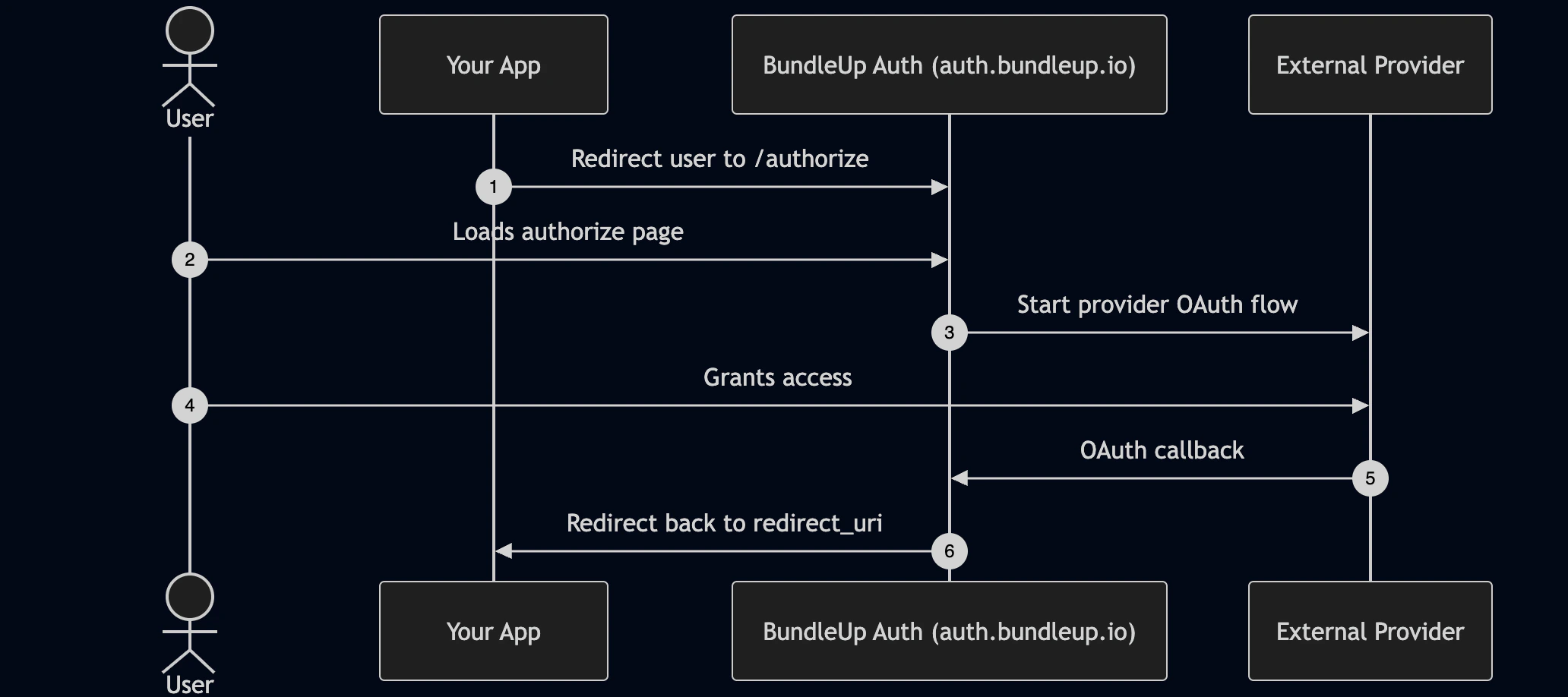 ### Step 1: Redirect the user to BundleUp
Your application redirects the user to BundleUp's authorization endpoint.
```text theme={null}
https://auth.bundleup.io/authorize
?client_id=YOUR_CLIENT_ID
&integration_id=INTEGRATION_ID
&redirect_uri=YOUR_CALLBACK_URL
&external_id=YOUR_EXTERNAL_ID
&state=YOUR_STATE
```
Identifies your BundleUp application.
Specifies which provider the user is connecting.
Where the user will be sent after authorization completes
User-defined reference that BundleUp stores on the connection and returns after authorization.
Optional value that is returned unchanged on the final redirect to your callback URL.
### Step 2: User authorizes with the provider
BundleUp initiates the OAuth flow with the selected provider.
The user is redirected to the provider's consent screen, where they grant access to their account. BundleUp completes the OAuth exchange and securely stores the resulting credentials.
OAuth tokens are never exposed to your application.
### Step 3: Redirect back with connection details
Once authorization completes, BundleUp redirects the user back to your `redirect_uri`.
```text theme={null}
?connection_id=conn_abc123
&integration_id=integration_xyz
&external_id=YOUR_EXTERNAL_ID
&state=YOUR_STATE
```
The redirect includes the following query parameters:
Uniquely identifies the connected external account.
Identifies which integration the connection belongs to.
The same value you provided at the start of the flow.
If provided in the initial authorization request, this value is returned unchanged.
## Auth response settings
BundleUp provides two dashboard toggles that control what is returned in the authorization redirect URL:
* `Include connection ID in Auth responses`
* `Include external ID in Auth responses`
When enabled, the corresponding value is included as a query parameter on your `redirect_uri`.
* If `Include connection ID in Auth responses` is enabled, `connection_id` is appended to the callback URL.
* If `Include external ID in Auth responses` is enabled, `external_id` is appended to the callback URL.
When disabled, that value is not included in the redirect URL. In this mode, you should consume the `connection.created` webhook event to retrieve newly created connection details instead of relying on redirect query parameters.
## After authorization
Once you receive the `connection_id`, the authentication flow is complete.
You use the connection ID for all future proxy or Unified API requests. OAuth does not need to be repeated unless the connection is revoked or expires.
All API execution happens from your backend using your BundleUp API key.
## Security model
Your BundleUp API key is never used in the browser and is never part of the authorization redirect. It is required only for server-to-server API requests.
The authorization flow relies on a client ID, redirect URI, and external ID, all of which are safe to expose publicly.
## Mental model
Think of this flow exactly like OAuth.
BundleUp acts as the authorization server.\
The provider acts as the resource owner.\
The connection ID is used for execution, and the external ID is used for your internal reference.
Once you have a connection ID, authentication is complete.
### Step 1: Redirect the user to BundleUp
Your application redirects the user to BundleUp's authorization endpoint.
```text theme={null}
https://auth.bundleup.io/authorize
?client_id=YOUR_CLIENT_ID
&integration_id=INTEGRATION_ID
&redirect_uri=YOUR_CALLBACK_URL
&external_id=YOUR_EXTERNAL_ID
&state=YOUR_STATE
```
Identifies your BundleUp application.
Specifies which provider the user is connecting.
Where the user will be sent after authorization completes
User-defined reference that BundleUp stores on the connection and returns after authorization.
Optional value that is returned unchanged on the final redirect to your callback URL.
### Step 2: User authorizes with the provider
BundleUp initiates the OAuth flow with the selected provider.
The user is redirected to the provider's consent screen, where they grant access to their account. BundleUp completes the OAuth exchange and securely stores the resulting credentials.
OAuth tokens are never exposed to your application.
### Step 3: Redirect back with connection details
Once authorization completes, BundleUp redirects the user back to your `redirect_uri`.
```text theme={null}
?connection_id=conn_abc123
&integration_id=integration_xyz
&external_id=YOUR_EXTERNAL_ID
&state=YOUR_STATE
```
The redirect includes the following query parameters:
Uniquely identifies the connected external account.
Identifies which integration the connection belongs to.
The same value you provided at the start of the flow.
If provided in the initial authorization request, this value is returned unchanged.
## Auth response settings
BundleUp provides two dashboard toggles that control what is returned in the authorization redirect URL:
* `Include connection ID in Auth responses`
* `Include external ID in Auth responses`
When enabled, the corresponding value is included as a query parameter on your `redirect_uri`.
* If `Include connection ID in Auth responses` is enabled, `connection_id` is appended to the callback URL.
* If `Include external ID in Auth responses` is enabled, `external_id` is appended to the callback URL.
When disabled, that value is not included in the redirect URL. In this mode, you should consume the `connection.created` webhook event to retrieve newly created connection details instead of relying on redirect query parameters.
## After authorization
Once you receive the `connection_id`, the authentication flow is complete.
You use the connection ID for all future proxy or Unified API requests. OAuth does not need to be repeated unless the connection is revoked or expires.
All API execution happens from your backend using your BundleUp API key.
## Security model
Your BundleUp API key is never used in the browser and is never part of the authorization redirect. It is required only for server-to-server API requests.
The authorization flow relies on a client ID, redirect URI, and external ID, all of which are safe to expose publicly.
## Mental model
Think of this flow exactly like OAuth.
BundleUp acts as the authorization server.\
The provider acts as the resource owner.\
The connection ID is used for execution, and the external ID is used for your internal reference.
Once you have a connection ID, authentication is complete.