

Authorization flow
The authentication flow consists of three steps.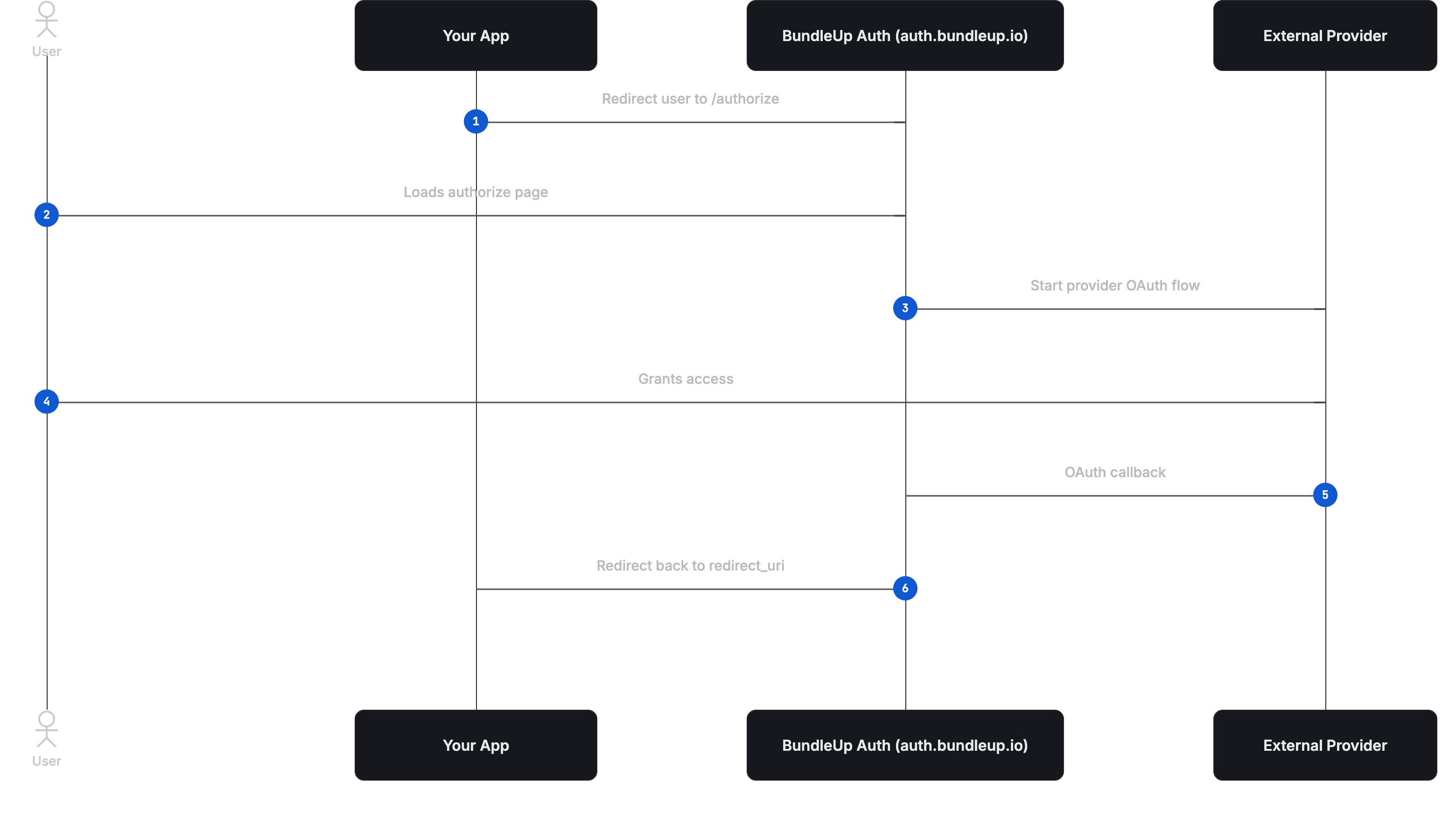
Step 1: Redirect the user to BundleUp
Your application redirects the user to BundleUp’s authorization endpoint.string
required
Identifies your BundleUp application.
string
required
Specifies which provider the user is connecting.
string
required
Where the user will be sent after authorization completes
string
User-defined reference that BundleUp stores on the connection and returns after authorization.
string
Optional value that is returned unchanged on the final redirect to your callback URL.
Step 2: User authorizes with the provider
BundleUp initiates the OAuth flow with the selected provider. The user is redirected to the provider’s consent screen, where they grant access to their account. BundleUp completes the OAuth exchange and securely stores the resulting credentials. OAuth tokens are never exposed to your application.Step 3: Redirect back with connection details
Once authorization completes, BundleUp redirects the user back to yourredirect_uri.
string
Uniquely identifies the connected external account.
string
Identifies which integration the connection belongs to.
string
The same value you provided at the start of the flow.
string
If provided in the initial authorization request, this value is returned unchanged.
Auth response settings
BundleUp provides two dashboard toggles that control what is returned in the authorization redirect URL:Include connection ID in Auth responsesInclude external ID in Auth responses
redirect_uri.
- If
Include connection ID in Auth responsesis enabled,connection_idis appended to the callback URL. - If
Include external ID in Auth responsesis enabled,external_idis appended to the callback URL.
connection.created webhook event to retrieve newly created connection details instead of relying on redirect query parameters.
After authorization
Once you receive theconnection_id, the authentication flow is complete.
You use the connection ID for all future proxy or Unified API requests. OAuth does not need to be repeated unless the connection is revoked or expires.
All API execution happens from your backend using your BundleUp API key.
Security model
Your BundleUp API key is never used in the browser and is never part of the authorization redirect. It is required only for server-to-server API requests. The authorization flow relies on a client ID, redirect URI, and external ID, all of which are safe to expose publicly.Mental model
Think of this flow exactly like OAuth. BundleUp acts as the authorization server.The provider acts as the resource owner.
The connection ID is used for execution, and the external ID is used for your internal reference. Once you have a connection ID, authentication is complete.